一、kubekey方式

文章参考链接:

GitHub:https://github.com/kubesphere/kubekey

kubesphere:https://get-images.kubesphere.io

微信公众号:https://mp.weixin.qq.com/s/HacD-QPS-7TzlQsDlKnj8Q(云原生测试补给站)

下载kubekey

1
curl -sfL https://get-kk.kubesphere.io | VERSION=vx.xx.xx sh -	# x.xx.xx为版本号

由于下载网站再国外,国内网络下载可能会很慢或者下载不成功,可以采用下面方式下载:

① 官方方案(个人感觉不好用)

1
2
export KKZONE=cn 	# 设置变量
curl -sfL https://get-kk.kubesphere.io | VERSION=vx.xx.xx sh - # x.xx.xx为版本号

② 个人推荐方案(手动下载后上传到服务器)

kubekey下载地址:https://github.com/kubesphere/kubekey/releases

1
2
tar zxvf kubekey-vx.xx.xx-*.tar.gz		# 解压软件包
./kk version # 查看版本

生成配置信息

kubekey版本低于4.0

1
./kk version --show-supported-k8s
1
./kk create config --with-kubernetes vx.xx.xx		# x.xx.xx替换为你需要安装的k8s版本

生成 config-sample.yaml 文件,文件内容大致如下:**(重点修改标颜色部分内容,name、ip地址、用户名和密码)**

1
2
3
4
5
6
7
8
9
10
11
12
13
14
15
16
17
18
19
20
21
22
23
24
25
26
27
28
29
30
31
32
33
34
35
36
37
38
39
40
41
42
43
44
apiVersion: kubekey.kubesphere.io/v1alpha2
kind: Cluster
metadata:
name: sample
spec:
hosts:
- {name: Master01, address: 192.168.0.6, internalAddress: 192.168.0.6, user: root, password: "QAZ@2wsx"}
- {name: node01, address: 192.168.0.144, internalAddress: 192.168.0.144, user: root, password: "QAZ@2wsx"}
- {name: node02, address: 192.168.0.121, internalAddress: 192.168.0.121, user: root, password: "QAZ@2wsx"}
roleGroups:
etcd:
- Master01
control-plane:
- Master01
worker:
- node01
- node02
controlPlaneEndpoint:
## Internal loadbalancer for apiservers
# internalLoadbalancer: haproxy

domain: lb.kubesphere.local
address: ""
port: 6443
kubernetes:
version: v1.33.4
clusterName: cluster.local
autoRenewCerts: true
containerManager: containerd
etcd:
type: kubekey
network:
plugin: calico
kubePodsCIDR: 10.233.64.0/18
kubeServiceCIDR: 10.233.0.0/18
## multus support. https://github.com/k8snetworkplumbingwg/multus-cni
multusCNI:
enabled: false
registry:
privateRegistry: ""
namespaceOverride: ""
registryMirrors: []
insecureRegistries: []
addons: []

kubekey版本高于4.0

1
./kk create inventory -o .

会生成 inventory.yaml ,文件内容如下:(重点修改标颜色部分内容)

1
2
3
4
5
6
7
8
9
10
11
12
13
14
15
16
17
18
19
20
21
22
23
24
25
26
27
28
29
30
31
32
33
34
35
36
37
38
39
40
41
42
43
44
45
46
47
48
49
50
51
52
53
54
55
56
57
apiVersion: kubekey.kubesphere.io/v1
kind: Inventory
metadata:
name: default
spec:
hosts: # your can set all nodes here. or set nodes on special groups.
master01: # 主机名
connector:
tyep: ssh
host: 192.168.0.6
port: 22
user: root
password: QAZ@2wsx
internal_ipv4: 192.168.0.6
node01: # 主机名
connector:
type: ssh
host: 192.168.0.144
port: 22
user: root
password: QAZ@2wsx
internal_ipv4: 192.168.0.144
node02: # 主机名
connector:
type: ssh
host: 192.168.0.121
port: 22
user: root
password: QAZ@2wsx
internal_ipv4: 192.168.0.121
groups:
# all kubernetes nodes.
k8s_cluster:
groups:
- kube_control_plane
- kube_worker
# control_plane nodes
kube_control_plane:
hosts:
- master01
# worker nodes
kube_worker:
hosts:
- master01
- node01
- node02
# etcd nodes when etcd_deployment_type is external
etcd:
hosts:
- master01
# image_registry:
# hosts:
# - localhost
# nfs nodes for registry storage. and kubernetes nfs storage
# nfs:
# hosts:
# - localhost
1
./kk create config --with-kubernetes <Kubernetes version> -o .

会生成 config-.yaml,文件内容如下:

1
2
3
4
5
6
7
8
9
10
11
12
13
14
15
16
17
18
19
20
21
22
23
24
25
26
27
28
29
30
31
32
33
34
35
36
37
38
39
40
41
42
43
44
45
46
47
48
49
50
51
52
53
54
55
56
57
58
59
60
61
62
63
64
65
66
67
68
69
70
71
72
73
74
75
76
77
78
79
80
81
82
83
84
85
86
87
88
89
90
91
92
93
94
95
96
97
98
99
100
101
102
103
104
105
106
107
108
109
110
111
112
113
114
115
116
117
118
119
120
121
122
123
124
125
126
127
128
129
130
apiVersion: kubekey.kubesphere.io/v1
kind: Config
spec:
# If set to "cn", online downloads will prioritize domestic sources when available.
zone: "cn" ## 此处很重要,如果填会导致你的镜像下载不成功
kubernetes:
# Specify the Kubernetes version to be installed.
kube_version: v1.34.3
# Specify the Helm version to be installed.
helm_version: v3.18.5
# Tag for the sandbox (pause) image used by pods.
sandbox_image:
tag: "3.10.1"
control_plane_endpoint:
# Supported HA types: local, kube-vip, haproxy.
# If set to local, configure local hostname resolution as follows:
# - Control-plane nodes: 127.0.0.1 .kubernetes.control_plane_endpoint.host
# - Worker nodes: .init_kubernetes_node .kubernetes.control_plane_endpoint.host
type: local
# Kube-vip image tag used for static pod deployment (when type is kube-vip).
kube_vip:
image:
tag: v0.7.2
# HAProxy image tag used for static pod deployment (when type is haproxy).
haproxy:
image:
tag: 2.9.6-alpine
etcd:
# Specify the etcd version to be installed.
etcd_version: v3.6.5
image_registry:
# Image registry type to install. Supported: harbor, docker-registry.
# Leave empty to skip installation (assuming an existing registry is available).
type: ""
# auth:
# # Address of the private image registry. Format: host:port/project
# # The port (if present) is used as http_port when plain_http=true,
# # or as https_port when plain_http=false.
# registry: "dockerhub.kubekey.local"
# # Use plain HTTP (no TLS). Default is false.
# plain_http: false
# username: admin
# password: Harbor12345
# Specify a VIP for image registry high availability. If set, enables HA.
ha_vip: ""
# ========== Image Registry - High Availability ==========
# keepalived image tag for load balancing when multiple registry nodes exist.
# keepalived_version: 2.3.4
# ========== Image Registry - Harbor ==========
# Image registry port settings. Usually you do not need to set them manually;
# they are derived from image_registry.auth.registry and plain_http.
# http_port: 80
# https_port: 443
# Harbor image tag (only valid if type is harbor).
#harbor_version: v2.10.2
# docker-compose binary
#dockercompose_version: v2.20.3
# ========== Image Registry - Docker Registry ==========
# Docker Registry image tag (only valid if type is docker-registry).
# docker_registry_version: 2.8.3
cri:
# Container runtime type. Supported: containerd, docker.
container_manager: containerd
# ========== CRI Tool ==========
# crictl binary version.
crictl_version: v1.34.0
# ========== Docker Runtime ==========
# Docker binary version.
#docker_version: 25.0.5
# cridockerd version (required for Kubernetes 1.24+).
# cridockerd_version: v0.3.21
# ========== Containerd Runtime ==========
# containerd binary version (active only when container_manager is containerd).
# containerd_version: v1.7.13
# runc binary version (active only when container_manager is containerd).
# runc_version: v1.1.12
cni:
# CNI plugin type. Supported: calico, cilium, flannel, hybridnet, kubeovn, other
type: calico
# ========== Multi-CNI ==========
# Multi-CNI type. Supported: multus, spiderpool, none.
multi_cni: none
# ========== Multi-CNI - Multus ==========
# Image tag for Multus (configure if needed).
# multus:
# image:
# tag: v4.2.4
# ========== Multi-CNI - Spiderpool ==========
# Spiderpool version (configure if needed).
# spiderpool_version: v1.1.1
# ========== Calico CNI ==========
# Calico version (effective only when type is calico).
calico_version: v3.31.3
# ========== Cilium CNI ==========
# Cilium version (effective only when type is cilium).
# cilium_version: 1.19.1
# ========== Flannel CNI ==========
# Flannel version (effective only when type is flannel).
#flannel_version: v0.27.4
# ========== Kube-OVN CNI ==========
# Kube-OVN version (effective only when type is kubeovn).
#kubeovn_version: v1.15.0
# ========== Hybridnet CNI ==========
# Hybridnet version (effective only when type is hybridnet).
#hybridnet_version: 0.6.8
storage_class:
# ========== Storage Class Configuration ==========
# ========== Local/OpenEBS Storage Class ==========
# Local storage class settings.
local:
enabled: true # Enable the local storage class.
default: true # Set as the default storage class.
# openebs/dynamic-localpv-provisioner helm chart version.
localpv_provisioner_version: 4.4.0
# ========== NFS Storage Class ==========
nfs:
enabled: false # Enable the NFS storage class.
# nfs-provisioner Helm chart version.
#nfs_provisioner_version: 4.0.18
dns:
# CoreDNS settings.
coredns:
image:
tag: v1.12.1
# NodeLocalDNS settings.
nodelocaldns:
enabled: true
image:
tag: 1.26.4
# the external images will to add in packages

初始化OS依赖

kubekey版本低于4.0

1
./kk init os -f config-sample.yaml

kubekey版本高于4.0

1
./kk init os -i inventory.yaml -c config-<Kubernetes version>.yaml

创建集群

kubekey版本低于4.0

1
./kk create cluster -f config-sample.yaml

kubekey版本高于4.0

1
./kk create cluster -i inventory.yaml -c config-<Kubernetes version>.yaml

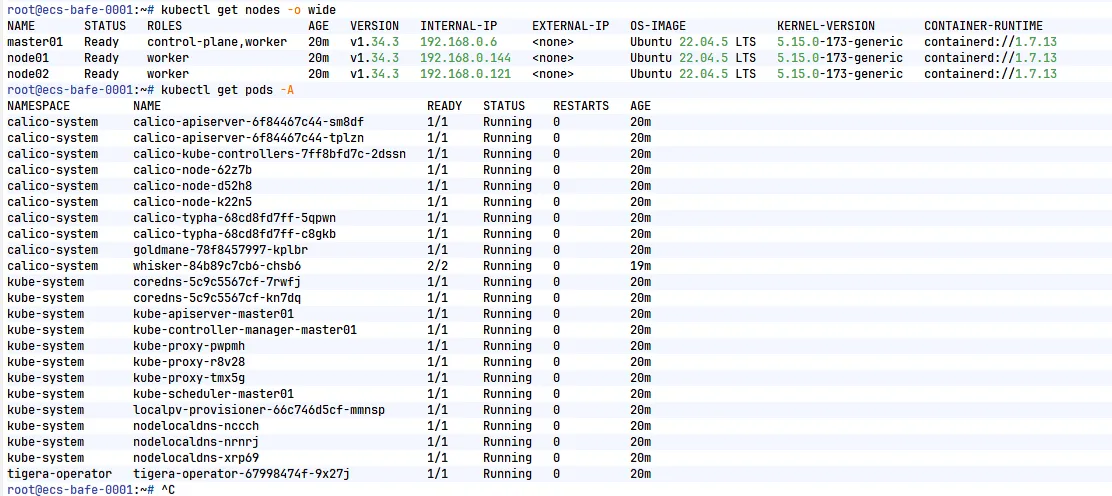
验证集群

1
2
kubectl get nodes -o wide
kubectl get pods _A

node节点状态均为Ready为正常,pod状态均为Running为正常
在这里插入图片描述

二、kubespray方式

文章参考链接:

roc 云原生:https://imroc.cc/kubernetes/deploy/kubespray/install

准备工作

下载kubespray

1
git clone --depth=1 https://github.com/kubernetes-sigs/kubespray.git

正常国内采用上面命令下载是不成功的,建议去github下载后上传到服务器

下载地址:https://github.com/kubernetes-sigs/kubespray/releases

1
2
3
4
# zip包解压 
unzip kubespray-<kubespray version>.zip
# tar包解压
tra zxvf kubespray-<kubespray version>.zip

安装依赖

1
2
cd kubespray-<kubespray version>
pip3 install -r requirements.txt

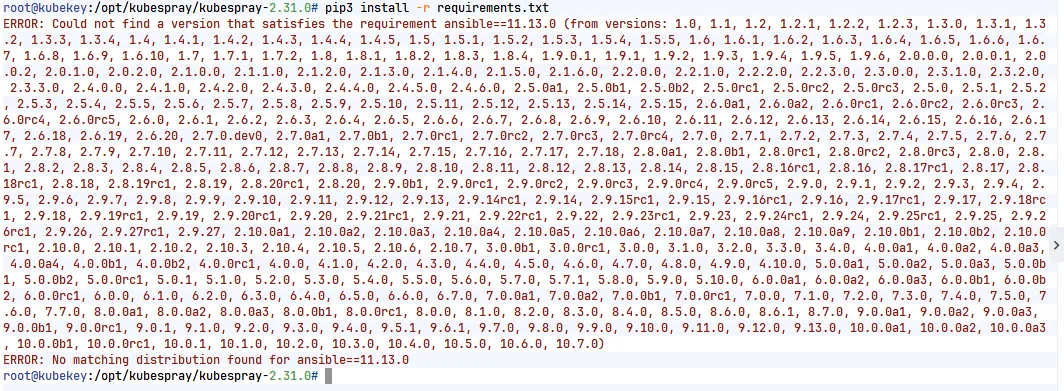
这里很容易出现下面的这种报错,这种报错原因是你的操作系统版本太低,kubespray版本太高的问题,换个高版本操作系统或者低版本kubespray就可以了
在这里插入图片描述

复制配置文件

1
cp -rfp inventory/sample inventory/mycluster

配置文件结构如下:

1
2
cd inventory
tree

.

├── local

│ ├── group_vars -> ../sample/group_vars

│ └── hosts.ini

├── mycluster

│ ├── group_vars

│ │ ├── all

│ │ │ ├── all.yml

│ │ │ ├── aws.yml

│ │ │ ├── azure.yml

│ │ │ ├── containerd.yml

│ │ │ ├── coreos.yml

│ │ │ ├── cri-o.yml

│ │ │ ├── docker.yml

│ │ │ ├── etcd.yml

│ │ │ ├── gcp.yml

│ │ │ ├── hcloud.yml

│ │ │ ├── huaweicloud.yml

│ │ │ ├── oci.yml

│ │ │ ├── offline.yml

│ │ │ ├── openstack.yml

│ │ │ ├── upcloud.yml

│ │ │ └── vsphere.yml

│ │ └── k8s_cluster

│ │ ├── addons.yml

│ │ ├── k8s-cluster.yml

│ │ ├── k8s-net-calico.yml

│ │ ├── k8s-net-cilium.yml

│ │ ├── k8s-net-custom-cni.yml

│ │ ├── k8s-net-flannel.yml

│ │ ├── k8s-net-kube-ovn.yml

│ │ ├── k8s-net-kube-router.yml

│ │ ├── k8s-net-macvlan.yml

│ │ └── kube_control_plane.yml

│ └── inventory.ini

└── sample

├── group_vars

│   ├── all

│   │   ├── all.yml

│   │   ├── aws.yml

│   │   ├── azure.yml

│   │   ├── containerd.yml

│   │   ├── coreos.yml

│   │   ├── cri-o.yml

│   │   ├── docker.yml

│   │   ├── etcd.yml

│   │   ├── gcp.yml

│   │   ├── hcloud.yml

│   │   ├── huaweicloud.yml

│   │   ├── oci.yml

│   │   ├── offline.yml

│   │   ├── openstack.yml

│   │   ├── upcloud.yml

│   │   └── vsphere.yml

│   └── k8s_cluster

│       ├── addons.yml

│       ├── k8s-cluster.yml

│       ├── k8s-net-calico.yml

│       ├── k8s-net-cilium.yml

│       ├── k8s-net-custom-cni.yml

│       ├── k8s-net-flannel.yml

│       ├── k8s-net-kube-ovn.yml

│       ├── k8s-net-kube-router.yml

│       ├── k8s-net-macvlan.yml

│       └── kube_control_plane.yml

└── inventory.ini

10 directories, 55 files

修改配置文件

基本配置修改

配置文件:inventory/mycluster/group_vars/k8s_cluster/k8s-cluster.yml

1
2
3
4
5
6
7
8
9
10
11
12
13
14
15
16
17
# 选择网络插件,支持 cilium, calico, weave 和 flannel
kube_network_plugin: calico

# 设置 Service 网段
kube_service_addresses: 10.233.0.0/18

# 设置 Pod 网段
kube_pods_subnet: 10.233.64.0/18

# 支持 docker, crio 和 containerd,推荐 containerd.
container_manager: containerd

# 是否开启 kata containers
kata_containers_enabled: false

# 是否开启自动更新证书,推荐开启。
auto_renew_certificates: true

准备机器列表

配置文件:**inventory/mycluster/inventory.ini**

1
2
3
4
5
6
7
8
9
10
11
12
13
14
15
16
17
18
19
20
21
22
23
24
25
26
27
[all]
master01 ansible_host=192.168.0.6
node01 ansible_host=192.168.0.144
node02 ansible_host=192.168.0.121

[all:vars]
ansible_user=root
ansible_password=QAZ@2wsx

[kube_control_plane]
master01

[etcd]
master01

[kube_node]
master01
node01
node02


[calico_rr]

[k8s_cluster:children]
kube_control_plane
kube_node
calico_rr

使用密码登录需要安装sshpass才能正常执行

1
2
3
4
旧版本系统:
sudo yum -y install sshpass
新版本系统:
sudo dnf -y install sshpass
1
sudo apt -y install sshpass

国内离线包准备(如果可以正常下载国外镜像此节点可忽略)

下载镜像及软件包

生成依赖文件和镜像列表
1
2
cd contrib/offline
bash generate_list.sh

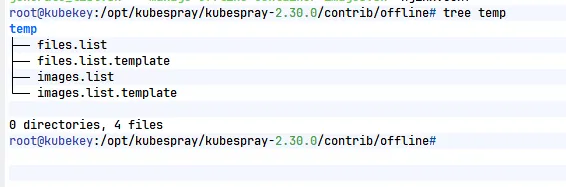
生成之后正常可以看到下内容

<img src="https://cdn.nlark.com/yuque/0/2026/png/29440596/1787792118729-2550c704-2d58-46e1-b256-17dc4ad81d56.png" width="566" title="" crop="0,0,1,1" id="uc7a01367" class="ne-image">

files.list 是依赖文件的列表

images.list 是依赖镜像的列表

下载静态文件
1
wget -x -P temp/files -i temp/files.list
设置下载服务(为了方便安装的时候可以通过自己的服务进行下载)
安装nginx
1
2
3
4
旧版本系统:
sudo yum -y install nginx
新版本系统:
sudo dnf -y install nginx
设置nginx配置文件

配置文件目录:**/etc/nginx/conf.d/download.conf **没有这个文件可以创建这个文件

1
2
3
4
5
6
7
8
9
10
11
12
13
14
15
16
17
18
19
20
21
22
23
24
25
26
27
28
29
server {
# 监听端口,如果 80 被占用或没有公网 IP,可以改为 8080 等高位端口
listen 80;

# 如果有域名填域名,没有域名填 localhost 或您的内网 IP
server_name localhost;

# 定义下载路径,访问 http://IP/download/ 即可看到文件列表
location /download/ {
# 【核心】指定本地文件的绝对路径
# Windows 用户注意:路径请使用正斜杠 / 或双反斜杠 \\,例如:D:/my_share_files/ 或 D:\\my_share_files\\
# Linux 用户注意:路径末尾必须带斜杠,例如:/data/my_share_files/
alias /root/kubespray/contrib/offline/temp/files/;

# 【核心】开启目录浏览功能(像 FTP 一样显示文件列表)
autoindex on;
autoindex_exact_size off; # 显示文件大小(KB/MB),而不是精确的字节数
autoindex_localtime on; # 显示文件时间为服务器本地时间

# 解决中文文件名/目录名乱码问题
charset utf-8;

# 大文件下载优化(防止下载大文件时内存占用过高或超时)
sendfile on;
tcp_nopush on;
tcp_nodelay on;
keepalive_timeout 300; # 增加超时时间,防止大文件下载中断
}
}
启动nginx
1
2
nginx -t			# 检测配置文件内容是否正确
systemctl restart nginx

修改配置文件

配置文件路径:**inventory/mycluster/group_vars/all/offline.yml,**可以按照以下修改,具体版本不同需要的内容不通

1
2
3
4
5
6
7
8
9
10
11
12
13
14
15
16
17
18
19
20
21
22
23
24
25
26
27
28
29
30
31
32
33
34
35
36
37
38
39
40
41
42
43
44
45
46
47
48
49
50
51
52
53
54
55
56
57
58
59
60
61
62
63
64
65
66
67
68
69
70
71
72
73
74
75
76
77
78
79
# 可以修改成自己的镜像仓库
registry_host: "swr.cn-north-4.myhuaweicloud.com/ddn-k8s/"
# 修改成自己nginx服务器的IP地址+目录
files_repo: "http://IP/download/"
### If using CentOS, RedHat, AlmaLinux or Fedora
# yum_repo: "http://myinternalyumrepo"
### If using Debian
# debian_repo: "http://myinternaldebianrepo"
### If using Ubuntu
# ubuntu_repo: "http://myinternalubunturepo"

## Container Registry overrides
# 参考以下内容修改,如果你有镜像仓库可以略微修改下
kube_image_repo: "{{ registry_host/registry.k8s.io }}"
gcr_image_repo: "{{ registry_host/gcr.io }}"
github_image_repo: "{{ registry_host/ghcr.io }}"
docker_image_repo: "{{ registry_host/docker.io }}"
quay_image_repo: "{{ registry_host/quay.io }}"

## Kubernetes components
kubeadm_download_url: "{{ files_repo }}/dl.k8s.io/release/v{{ kube_version }}/bin/linux/{{ image_arch }}/kubeadm"
kubectl_download_url: "{{ files_repo }}/dl.k8s.io/release/v{{ kube_version }}/bin/linux/{{ image_arch }}/kubectl"
kubelet_download_url: "{{ files_repo }}/dl.k8s.io/release/v{{ kube_version }}/bin/linux/{{ image_arch }}/kubelet"


## Two options - Override entire repository or override only a single binary.

## [Optional] 1 - Override entire binary repository
# github_url: "https://my_github_proxy"
# dl_k8s_io_url: "https://my_dl_k8s_io_proxy"
# storage_googleapis_url: "https://my_storage_googleapi_proxy"
# get_helm_url: "https://my_helm_sh_proxy"

## [Optional] 2 - Override a specific binary
## CNI Plugins
cni_download_url: "{{ files_repo }}/github.com/containernetworking/plugins/releases/download/v{{ cni_version }}/cni-plugins-linux-{{ image_arch }}-v{{ cni_version }}.tgz"

## cri-tools
crictl_download_url: "{{ files_repo }}/github.com/kubernetes-sigs/cri-tools/releases/download/v{{ crictl_version }}/crictl-v{{ crictl_version }}-{{ ansible_system | lower }}-{{ image_arch }}.tar.gz"

## [Optional] etcd: only if you use etcd_deployment=host
etcd_download_url: "{{ files_repo }}/github.com/etcd-io/etcd/releases/download/v{{ etcd_version }}/etcd-v{{ etcd_version }}-linux-{{ image_arch }}.tar.gz"

# [Optional] Calico: If using Calico network plugin
calicoctl_download_url: "{{ files_repo }}/github.com/projectcalico/calico/releases/download/v{{ calico_ctl_version }}/calicoctl-linux-{{ image_arch }}"
# [Optional] Calico with kdd: If using Calico network plugin with kdd datastore
calico_crds_download_url: "{{ files_repo }}/github.com/projectcalico/calico/archive/v{{ calico_version }}.tar.gz"

# [Optional] Cilium: If using Cilium network plugin
ciliumcli_download_url: "{{ files_repo }}/github.com/cilium/cilium-cli/releases/download/v{{ cilium_cli_version }}/cilium-linux-{{ image_arch }}.tar.gz"

# [Optional] helm: only if you set helm_enabled: true
helm_download_url: "{{ files_repo }}/get.helm.sh/helm-v{{ helm_version }}-linux-{{ image_arch }}.tar.gz"

# [Optional] crun: only if you set crun_enabled: true
crun_download_url: "{{ files_repo }}/github.com/containers/crun/releases/download/{{ crun_version }}/crun-{{ crun_version }}-linux-{{ image_arch }}"

# [Optional] kata: only if you set kata_containers_enabled: true
kata_containers_download_url: "{{ files_repo }}/github.com/kata-containers/kata-containers/releases/download/{{ kata_containers_version }}/kata-static-{{ kata_containers_version }}-{{ image_arch }}.tar.xz"

# [Optional] cri-dockerd: only if you set container_manager: docker
cri_dockerd_download_url: "{{ files_repo }}/github.com/Mirantis/cri-dockerd/releases/download/v{{ cri_dockerd_version }}/cri-dockerd-{{ cri_dockerd_version }}.{{ image_arch }}.tgz"

# [Optional] runc: if you set container_manager to containerd or crio
runc_download_url: "{{ files_repo }}/github.com/opencontainers/runc/releases/download/v{{ runc_version }}/runc.{{ image_arch }}"

# [Optional] cri-o: only if you set container_manager: crio
# crio_download_base: "download.opensuse.org/repositories/devel:kubic:libcontainers:stable"
# crio_download_crio: "http://{{ crio_download_base }}:/cri-o:/"
crio_download_url: "{{ files_repo }}/storage.googleapis.com/cri-o/artifacts/cri-o.{{ image_arch }}.v{{ crio_version }}.tar.gz"
skopeo_download_url: "{{ files_repo }}/github.com/lework/skopeo-binary/releases/download/v{{ skopeo_version }}/skopeo-linux-{{ image_arch }}"

# [Optional] containerd: only if you set container_runtime: containerd
containerd_download_url: "{{ files_repo }}/github.com/containerd/containerd/releases/download/v{{ containerd_version }}/containerd-{{ containerd_version }}-linux-{{ image_arch }}.tar.gz"
nerdctl_download_url: "{{ files_repo }}/github.com/containerd/nerdctl/releases/download/v{{ nerdctl_version }}/nerdctl-{{ nerdctl_version }}-{{ ansible_system | lower }}-{{ image_arch }}.tar.gz"

# [Optional] runsc,containerd-shim-runsc: only if you set gvisor_enabled: true
gvisor_runsc_download_url: "{{ files_repo }}/storage.googleapis.com/gvisor/releases/release/{{ gvisor_version }}/{{ ansible_architecture }}/runsc"
gvisor_containerd_shim_runsc_download_url: "{{ files_repo }}/storage.googleapis.com/gvisor/releases/release/{{ gvisor_version }}/{{ ansible_architecture }}/containerd-shim-runsc-v1"

部署集群

1
2
3
4
# 回到kubespray主目录再执行下面命令
ansible-playbook \
-i inventory/mycluster/inventory.ini \
cluster.yml

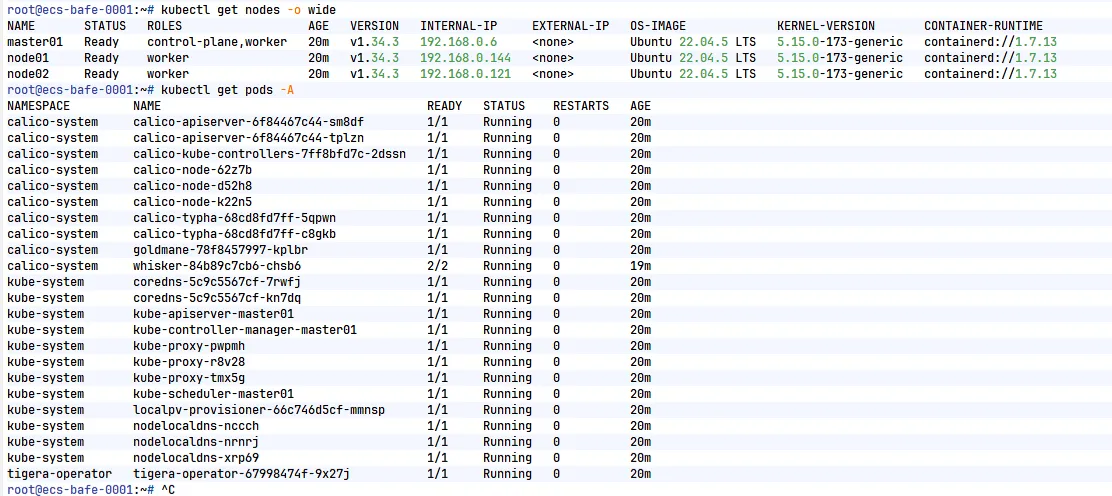
验证集群

1
2
kubectl get nodes -o wide
kubectl get pods _A

node节点状态均为Ready为正常,pod状态均为Running为正常

在这里插入图片描述